Mapping and Unmapping Single Jira Project
Map a single Jira project to a QMetry project so that the selected Jira work items sync to the QMetry Requirements module, the Issues module, or both.
You can map only the Jira projects that the Jira system administrator enabled for integration with QMetry.
Prerequisites
Before you map a Jira project, make sure you meet the following requirements:
You have QMetry project administrator rights.
The Jira integration is active for this QMetry instance.
The Jira system administrator enabled the Jira project for integration with this QMetry instance.
Map a Single Jira Project
To map a Jira project, perform the following steps:
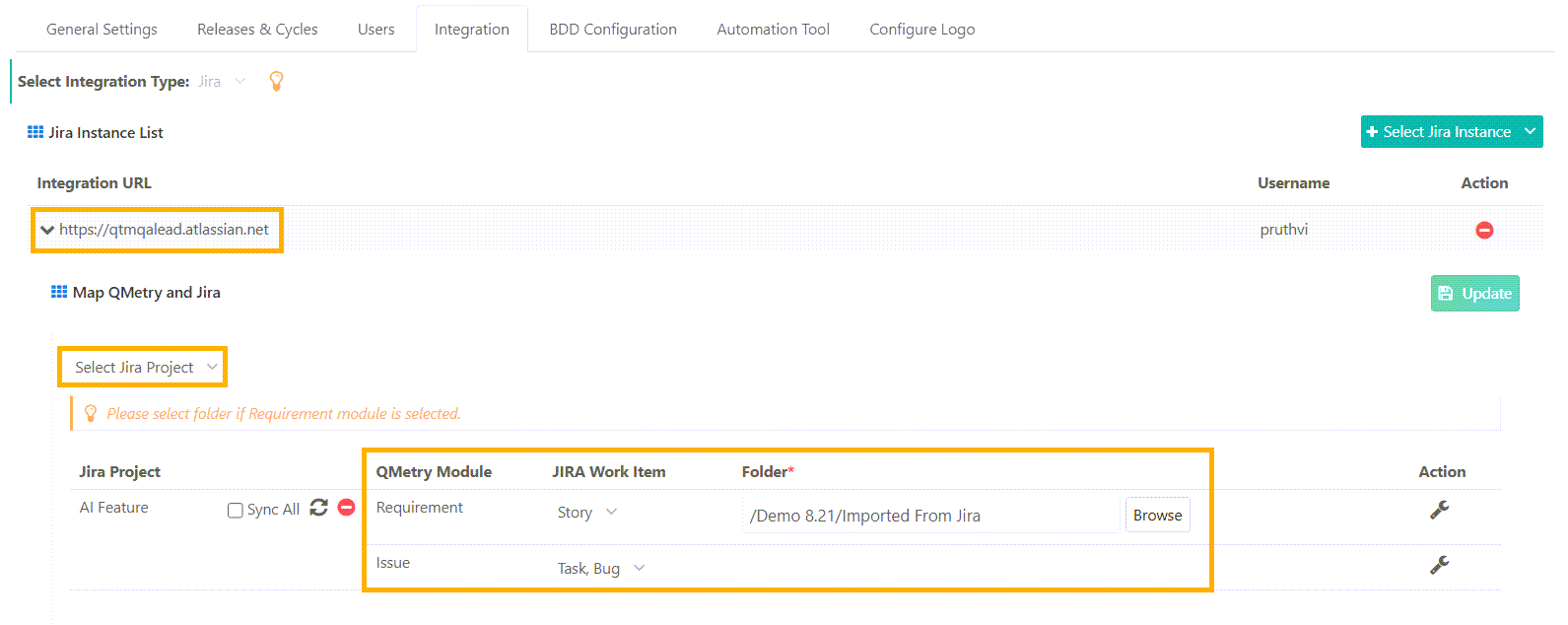 |
Go to Project Management and open Projects.
Select the project and open the Integrations tab.
In the Jira Instance List, select the Jira URL to map with QMetry project.
In the Select Jira Project list, select the Jira project to configure.
Set the JIRA Work Item and QMetry Module associations.
Work Item is a multi-select list.
For mapping requirements, select a folder.
Apply Jira Query Language (JQL) filters to customise Jira work items sync with QMetry Requirements and Issues modules. For more information, see Filter Synced Work Items Using JQL.
Click Save and Activate. If the Jira integration is already saved and activated for this QMetry project, click Update.
Note
JIRA Work Item is a multi-select list. When you map work items to the Requirements module, you must also select a folder.
To save a project mapping, map at least one work item to the Requirements module or the Issues module.
If the Jira Project You Need Is Not Listed
The Select Jira Project list shows only the Jira projects that the Jira system administrator enabled for integration. A Jira project does not appear in the list if it is disabled for QMetry integration.
Removing the Link Between a Jira Project and a QMetry Project
You remove the link between a Jira project and a QMetry project from within QMetry. This is the only action that removes the link.
Action | Effect on the link |
|---|---|
You remove the integration for the Jira project in QMetry | The link is removed. |
A QMetry project is deleted in QMetry | The association with the linked Jira project is removed automatically. |
The Jira system administrator removes the connection to this QMetry instance in Jira | The link is kept, so that no test data is lost. The Jira project continues to show this instance in Jira until you remove the integration in QMetry. |
A Jira project is deleted or archived in Jira | The link is kept, along with the QMetry data. If the Jira project is restored, the integration continues to work. If it is not restored, remove the integration in QMetry. |
Note
A Jira project cannot be disabled in Jira while it is linked to a QMetry project. Remove all of its QMetry project integrations here first.
Projects Without Work Item Mapping to the Issue Module
When a QMetry project is integrated with an external tracker but no work items are mapped to the Issues module, the following behavior applies:
QMetry disables issue creation and linking options across the Requirements, Test Cases, Executions, and Exploratory Testing.
The Issues module does not display any issue list or filter options. Instead, it displays a message that no work items are mapped.
Issue-based dashboards and issue sections in system reports appear blank.